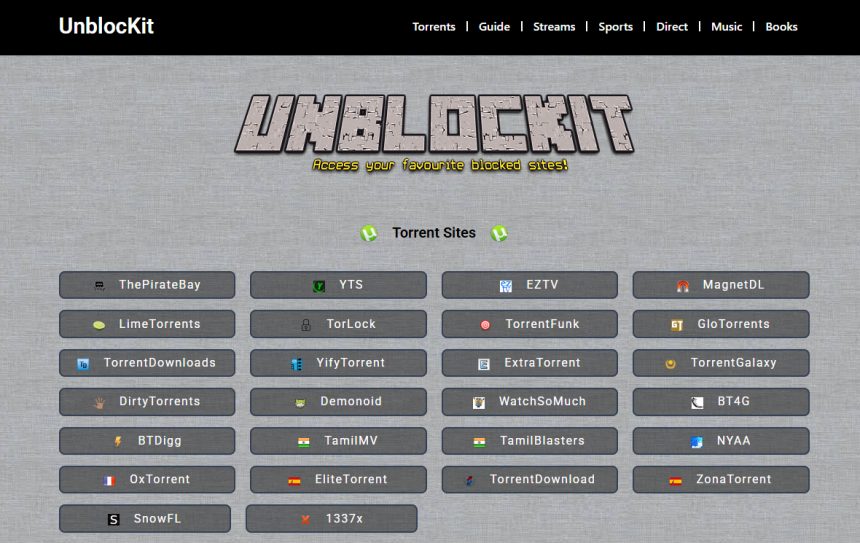
Accessing torrent websites has become more complicated than ever, thanks to increasing geo-blocks, ISP restrictions, and legal scrutiny. Among the most blocked platforms globally is The Pirate Bay, the iconic torrent index that continues to draw traffic despite frequent takedowns. That’s where tools like Unblockit come into play. But how safe is it really to access The Pirate Bay through Unblockit? Let’s break it down.
Understanding What Unblockit Does
Unblockit is a proxy website that acts as a middleman between your device and restricted sites. If your ISP has blocked The Pirate Bay, visiting the official URL might result in an error or redirect. Unblockit bypasses that by redirecting you through a different domain or mirror, granting access as if the site were never blocked.
Unlike traditional VPNs, Unblockit doesn’t encrypt your data or change your IP address. Instead, it serves as a web-based workaround—essentially loading the blocked site’s content for you through its own servers. It’s fast, simple, and doesn’t require installing any software.
Why The Pirate Bay Gets Blocked
The Pirate Bay has long been a thorn in the side of governments, copyright holders, and ISPs. It hosts magnet links and torrent files for movies, games, software, and more—often shared without proper licensing. As a result, it has been banned in dozens of countries including the UK, Australia, and parts of Europe.
Authorities usually enforce these bans at the ISP level. That means you might not be able to access thepiratebay.org directly, but the site itself is still active—just unreachable through regular means.
Proxy vs VPN: Key Differences in Accessing Blocked Sites
When discussing access to The Pirate Bay, users often weigh two major options: proxies like Unblockit or VPNs like NordVPN or ExpressVPN.
| Feature | Proxy (Unblockit) | VPN |
| Hides IP | ❌ No | ✅ Yes |
| Encrypts Data | ❌ No | ✅ Yes |
| Bypasses Geo-Blocks | ✅ Yes | ✅ Yes |
| Speeds | ✅ Fast | ⚠️ Slower (depends on server) |
| Installation Required | ❌ No | ✅ Yes |
| Security | ⚠️ Basic | ✅ Strong |
Unblockit’s primary appeal lies in its simplicity. You don’t need to subscribe, install, or configure anything. But it also means you’re not getting the privacy and data protection that comes with a VPN.
How Unblockit Provides Access to The Pirate Bay
Unblockit maintains a rotating list of mirror URLs and proxy sites that point to The Pirate Bay. These mirrors are often clones hosted on different domains but pull real-time content from the original site. When you visit Unblockit’s homepage, it presents clickable links for various torrent websites—including The Pirate Bay.
Evaluating Safety and Risks
Let’s be clear—accessing The Pirate Bay through Unblockit is not without risk. While the platform is convenient, it does expose users to potential threats:
- Malware-injected proxies: Some mirrors may be malicious, even if they load the correct content. These sites can push pop-ups or background scripts that install harmful software.
- Lack of encryption: Without HTTPS or a VPN, your ISP can see your browsing activity—even if you’re on a mirror.
- Legal concerns: Depending on your jurisdiction, accessing pirated content—even via proxy—could lead to penalties.
That said, Unblockit is considered one of the more reliable and reputable proxy directories, used by thousands of torrent fans. It doesn’t require logins or downloads, and it doesn’t try to scam users overtly.
Verifying If a Proxy Is Legitimate
With so many fake or cloned Pirate Bay proxies floating online, distinguishing a safe proxy from a dangerous one is crucial.
Here’s how to tell if the proxy you’re using through Unblockit is legit:
- Check the URL carefully: Reputable domains usually use names like “proxy,” “mirror,” or include “piratebay” in recognizable ways.
- Look for HTTPS encryption: While not all mirrors use HTTPS, it’s a good indicator of safer browsing.
- Scan with online tools: Websites like VirusTotal let you paste a URL and check for known malware or phishing reports.
- Avoid pop-up spam: Excessive ads, auto-play videos, and forced redirects are red flags.
Browser Protection Strategies
To make your Unblockit session safer, use browser extensions that enhance security:
- uBlock Origin: Blocks ads and malicious scripts.
- HTTPS Everywhere: Forces sites to use secure connections when available.
- NoScript: Blocks JavaScript unless you allow it.
These tools minimize exposure to infected scripts and deceptive ads, especially when visiting torrent mirrors.
Should You Use a VPN Alongside Unblockit?
Combining Unblockit with a VPN is the safest way to access The Pirate Bay. While Unblockit handles the unblocking part, a VPN covers your tracks by encrypting traffic and masking your IP. This protects you from ISP throttling, legal scrutiny, and potential spying.
Many tech-savvy users use both together—first enabling their VPN, then visiting Unblockit to access the latest Pirate Bay proxy. This dual-layered approach balances convenience and security.
Alternatives to Unblockit
If Unblockit ever goes offline or becomes inaccessible, consider these alternatives:
- Bypass Proxy – Similar layout and proxy list as Unblockit.
- ProxyBay – Focused solely on The Pirate Bay mirrors.
- Torrent Galaxy Proxy – Offers multiple torrent site proxies, not just TPB.
Also, installing a dedicated VPN with torrent-friendly servers remains a longer-term, safer solution.
Legal Implications You Should Know
Torrenting itself isn’t illegal in most countries. However, downloading copyrighted content without permission is. Governments and ISPs monitor these activities, and even accessing torrent indexers like The Pirate Bay can raise flags.
Unblockit may make access easier, but it doesn’t provide legal protection. If caught, users might face:
- ISP warnings or account suspension
- Fines or civil lawsuits
- Criminal charges (rare but possible)
This is why some users stick to legal torrent sites like Public Domain Torrents or Internet Archive for peace of mind.
Torrenting Safer with Magnet Links
When using The Pirate Bay via Unblockit, magnet links are your best bet. Unlike traditional .torrent files, magnet links don’t require downloading a separate file—they connect directly to peers and are harder for authorities to track.
Always choose magnet links when available, especially if you’re not using a VPN.
Staying Updated with Working Proxies
Unblockit itself might face takedowns or DNS bans. If that happens, here’s how to stay updated:
- Bookmark official Twitter handles: Unblockit often posts updates through social media.
- Use forums like Reddit’s r/Piracy: Communities frequently share live links and alternatives.
- Search through mirror directories: Google “Unblockit new link” or “working Pirate Bay proxy” to find the latest URLs.
Conclusion
Using Unblockit to access The Pirate Bay is relatively safe for experienced users who take basic precautions—ad blockers, antivirus software, browser security plugins, and ideally a VPN.
However, it’s not a silver bullet. It doesn’t protect your IP, encrypt your data, or provide legal cover. Think of it as a shortcut, not a shield.
For light torrent users in regions where copyright enforcement is minimal, Unblockit may be sufficient. But for frequent downloaders or privacy-focused users, pairing it with a VPN is strongly recommended.