If you have ever released a song and watched it underperform simply because it lacked a compelling visual, you already know the problem. Audiences today expect more than audio alone, and lyric videos have become one of the most accessible, cost-effective ways to meet that expectation. The good news is that you no longer need a production studio, a motion graphics degree, or a five-figure budget to create something that looks polished and professional. A growing number of online services now make it possible for independent musicians and content creators to build beautiful lyric videos complete with branded colors, logos, fonts, and animated text, all from a web browser.
Read More: SeedMusic
Why Lyric Videos Matter More Than Ever for Independent Artists
The shift toward short-form and visual content has changed how people discover music. Platforms like YouTube, Instagram Reels, and TikTok prioritize video in their algorithms, which means an audio-only release is competing at a disadvantage. Lyric videos fill an important gap: they are far cheaper and faster to produce than full music videos, yet they give listeners something to watch and share. When done well, they also reinforce your brand identity by using consistent visual elements that audiences begin to associate with your name and sound.
Beyond discoverability, lyric videos serve a practical purpose for your audience. When people can follow along with your words, they build a stronger connection to the song. They are also more likely to remember the track, search for more of your music, and share the content with their own followers. For content creators who are not musicians themselves, lyric videos work equally well for spoken word pieces, podcast highlight reels, and educational content that benefits from on-screen text reinforcement.
The challenge has always been accessibility. Traditional video production requires specialized software, a working knowledge of animation, and significant time investment. Online lyric video tools have changed that equation entirely, putting broadcast-quality output within reach of anyone with a laptop and a creative vision.
What to Look for in an Online Lyric Video Service
Before you commit to any single platform, it helps to know what features actually matter. Not every tool is built with musicians in mind, and the differences between a good lyric video tool and a great one can significantly affect both your workflow and your final output.
Here are the key features worth evaluating:
- Text animation options: Look for tools that let you sync or time lyrics to specific moments in the track rather than just placing static text over a background.
- Branding controls: You should be able to upload your own logo, apply custom colors that match your brand palette, and use fonts that reflect your visual identity.
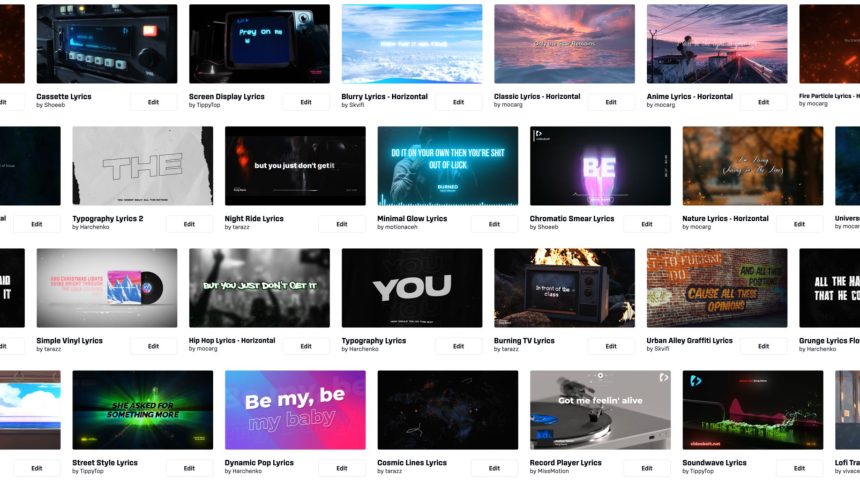
- Template variety: A strong library of templates gives you a starting point without locking you into a generic look. The best services let you customize every element.
- Audio integration: The tool should let you upload your audio file directly so you can preview how the visuals sync with your music in real time.
- Export quality: Make sure the platform exports in resolutions suitable for YouTube (1080p at minimum) and in formats that social platforms accept without heavy compression artifacts.
- Aspect ratio flexibility: Different platforms have different requirements. A good tool will let you create square, vertical, and widescreen versions from the same project.
Ease of use matters too. A drag-and-drop interface reduces the learning curve so you can spend your creative energy on storytelling and aesthetics rather than fighting a clunky editor.
Tips for Making Lyric Videos That Actually Get Watched
1. Start with Your Brand Identity, Not a Template
It is tempting to grab the first template that looks close to what you want, but the best lyric videos are built around a clear visual identity rather than adapted from someone else’s. Before you open any tool, decide on your three to five core brand colors, your preferred font pairings, and the overall mood you want to evoke. Dark and cinematic? Bright and energetic? Minimalist and editorial? When your visual choices reflect your music’s personality, the video feels cohesive rather than assembled.
Once you have those elements defined, templates become a structural shortcut rather than a creative constraint. You are simply using the template to handle the technical layout while you replace every visual element with your own.
2. Use Adobe Express to Build Professional Lyric Videos Fast
One of the most well-rounded options available to independent creators is Adobe Express. The platform offers a dedicated lyric video maker that combines ease of use with a level of visual sophistication that most browser-based tools cannot match. You can choose from a wide range of video templates, customize colors and fonts to reflect your brand, add your logo, and animate text to appear in sync with your track. The interface is designed to be approachable for non-designers while still offering enough control to produce results that look anything but amateur.
Adobe Express also integrates with Adobe’s broader creative ecosystem, which is a meaningful advantage if you already use other Adobe products. Assets you have created or stored carry over, and the export options cover the major platforms without requiring additional format conversion. For musicians who want a single tool that handles both one-off projects and consistent, branded content across a full release campaign, it is one of the most capable options in the space.
3. Prioritize Legibility Over Decoration
One of the most common mistakes in lyric videos is choosing fonts or backgrounds that look visually interesting but make the text difficult to read. If your audience has to squint or pause the video to catch a line, the lyric video is working against its own purpose. High contrast between text and background is non-negotiable. If your background is dark, use light text. If your background is light or colorful, use dark or white text with a subtle shadow or outline to keep it readable.
Keep font sizes generous, especially for viewers watching on mobile devices. Test your video on a phone screen before you finalize it, because what looks perfectly legible on a desktop monitor can become nearly unreadable on a 6-inch screen. Simplicity in typography almost always outperforms complexity when it comes to lyric videos.
4. Match Your Visual Pacing to the Song’s Energy
The timing and style of your text animations should feel like an extension of the music itself, not an afterthought layered on top of it. A slow, emotional ballad calls for gentle fade-ins and soft transitions. A high-energy hip-hop track or an upbeat pop song benefits from faster cuts, bolder entrance animations, and more kinetic movement. When the visual rhythm matches the sonic rhythm, the viewer experiences the song more deeply rather than being distracted by a mismatch.
Most online lyric video tools give you control over how and when text elements appear and disappear. Take the time to preview each section of the song and adjust the timing so that lyric cues land naturally. Even a small investment of time in this step dramatically improves the final product.
5. Create Multiple Format Versions from a Single Project
A single lyric video project should ideally produce at least three finished versions: a widescreen 16:9 ratio for YouTube, a square 1:1 ratio for Instagram feed posts, and a vertical 9:16 ratio for Reels, TikTok, and YouTube Shorts. Many online services make this relatively straightforward by allowing you to resize and reformat a project without rebuilding it from scratch.
Planning for this from the start means your branding stays consistent across every platform without requiring you to redo creative work multiple times. It also dramatically increases the reach of a single piece of content.
6. Keep Background Visuals Secondary
Animated or video backgrounds can add depth and energy to a lyric video, but they can also compete with the text if they are too busy. Abstract motion graphics, slow gradient animations, subtle particle effects, and gently looping visual textures all work well because they provide visual interest without demanding the viewer’s full attention. Avoid backgrounds with rapid movement, high-contrast patterns, or realistic footage of objects and people, all of which naturally draw the eye away from the words on screen.
A useful test: watch your video with the sound off. If you find yourself watching the background instead of reading the lyrics, the background is too dominant. Dial it back until the text naturally becomes the focal point.
7. Build a Lyric Video Template You Can Reuse
If you release music regularly, one of the highest-leverage things you can do is invest time in building a single branded lyric video template that you can use for every future release. This means setting up your colors, fonts, logo placement, and general layout once, then simply swapping in the new song’s lyrics and audio for each project. The time savings compound quickly over a full release cycle, and the visual consistency across your catalog reinforces your brand identity in a way that audiences notice even if they cannot articulate why.
Most online lyric video services allow you to save projects and duplicate them, making this kind of workflow entirely practical even without any design background.
8. Add Your Branding to Every Frame Strategically
Watermarking or logo placement is about more than protecting your content. When your lyric video gets shared outside of its original context, which happens often on social media, the branding ensures that new viewers can identify whose music they are hearing and where to find more. A tastefully placed logo in the corner of the video accomplishes this without being intrusive. Including your artist handle, website, or streaming service name as part of the lower third or end screen also helps convert passive viewers into active listeners and followers.
Avoid placing branding in ways that block the lyrics or crowd the frame. Transparency and scale matter: a logo that is too large or too opaque reads as desperate rather than professional.
9. Write Compelling On-Screen Phrasing for Choruses
In a lyric video, every line of text has visual weight. Choruses, which are already the most emotionally resonant parts of a song, are an opportunity to amplify that impact with intentional design choices. Consider making chorus lines slightly larger, bolder, or more visually distinct than verse lines. Some creators use a different color or animation style for the chorus to signal to the viewer that the emotional peak of the song has arrived. This hierarchy guides the audience’s experience in the same way that a live performance uses volume and energy to signal the most important moments.
This kind of typographic storytelling transforms a lyric video from a simple subtitle reel into a genuine piece of visual art.
10. End with a Strong Call to Action
Your lyric video should not simply fade to black. The final few seconds are prime real estate for directing your audience toward their next step with you. This might be an end screen that includes your streaming links, a short phrase encouraging viewers to follow your channel, a teaser for your next release, or a link to your mailing list. Keep it clean and consistent with the visual style of the rest of the video. A well-designed outro adds a layer of professionalism and gives motivated viewers a clear path forward rather than leaving them to figure it out on their own.
FAQ: Online Lyric Video Services for Musicians and Content Creators
What is the best format to export a lyric video for YouTube?
YouTube recommends exporting videos in MP4 format using H.264 encoding, with a resolution of at least 1920×1080 pixels and a frame rate of 24, 25, or 30 frames per second. Most reputable online lyric video services export in these specifications by default, but it is always worth double-checking before you upload. Audio should be exported at a high bitrate, typically 320 kbps for AAC, to ensure the quality of your track is not compromised in the upload process. If your tool offers a choice between compression levels, opt for the highest quality available. YouTube applies its own compression during processing, so starting with the best possible source file helps preserve audio and video quality in the final public version.
Do I need to own the master recording of a song to upload a lyric video to YouTube?
Yes, you need to have the rights to use both the musical composition and the master recording before uploading a lyric video to YouTube. If you are an independent artist who owns your masters, this is straightforward. If you are signed to a label or have licensed your music through a distributor, you will want to confirm what rights you hold for video content specifically. It is also important to register your content through YouTube’s Content ID system if you want to monetize views and protect against unauthorized use. For guidance on music rights and distribution, DistroKid’s help center offers accessible explanations specifically written for independent musicians navigating digital distribution and platform policies.
Can I use a lyric video service if I have no design experience?
Absolutely. The entire value proposition of modern online lyric video services is that they are built for people who are not designers. Most platforms use drag-and-drop interfaces, pre-built templates, and intuitive controls that guide you through the process without requiring any knowledge of animation software or graphic design principles. The learning curve is typically measured in minutes rather than hours. You will get better results faster if you come in with a clear sense of your visual brand (colors, fonts, mood), but even without that foundation, a well-chosen template and some basic customization will produce a result that looks far more polished than anything created without a tool at all.
How long should a lyric video be?
In most cases, a lyric video should match the full length of the song, which typically falls between two and a half and four minutes for commercial tracks. However, platform strategy matters. If your primary goal is discoverability on TikTok or Instagram Reels, creating a shorter clip that covers just the hook or a particularly emotional lyric moment may perform better in those environments. YouTube and Spotify Canvas (which supports short looping video clips on song pages) have different format requirements and audience behaviors, so it is worth creating platform-specific versions when your distribution strategy calls for it. Many creators produce both a full-length version for YouTube and a 30-to-60-second vertical clip for social media from the same source project.
Are there copyright concerns with the fonts and music I use in my lyric video?
Yes, and this is an area where creators sometimes get into trouble. Fonts, like music, are protected by copyright. Not every font you can download or access through a platform is licensed for commercial use. When selecting fonts for your lyric video, always verify that the license covers commercial use, especially if you plan to monetize the content or use it to promote a product or service. Many online lyric video services include built-in font libraries that are already licensed for commercial use, which simplifies this concern significantly. As for the music itself, the same rules apply as with any other video upload: you must own or have obtained the appropriate licenses for every piece of audio in your video, including any background music separate from the main track.
Conclusion
Creating a lyric video that looks professional, reflects your brand, and actually gets watched is more achievable than it has ever been. The tools available today make it possible for any musician or content creator to produce polished visual content without a background in design or video production. The key is approaching the process with intention: starting from your brand identity, choosing a platform that matches your workflow needs, and applying consistent creative decisions throughout the project.
Whether you are releasing your first single or building out the visual identity for an entire album campaign, lyric videos offer one of the best returns on your creative investment. They give audiences something to watch, share, and return to. They reinforce your brand across every platform where you distribute content. And with the right online service, they take far less time to produce than you might expect. Start with one strong template, make it yours, and build from there.