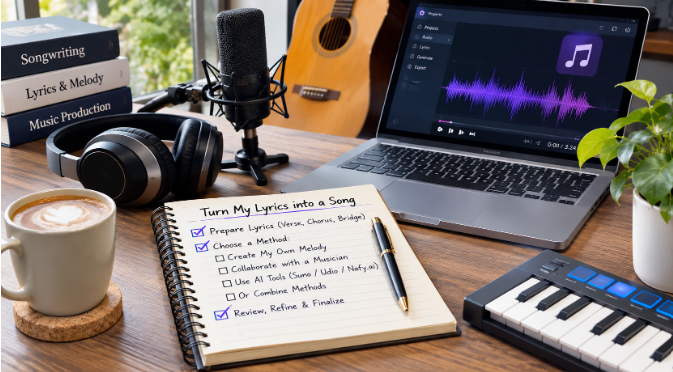
Plenty of people write lyrics without ever hearing them sung. They live in notebooks, in phone notes, in the margins of a planner. Some are finished songs in every sense except the one that matters: nobody has put a melody under them yet.
If that describes your drafts folder, you have more options now than songwriters did even a few years ago. You can hum a tune yourself, team up with a musician, or try one of the AI tools built to generate music from written text. Several services work this way, including Suno, Udio and nafy.ai, and each one has its own workflow.
This guide compares four routes, explains what each one asks of you, and covers the questions about rights and consent that are worth settling before you share anything.
First, get the lyrics ready
Whatever route you choose, a little preparation makes the result better. These steps apply to every method below.
Label the sections. Mark which lines are the verse, the chorus and the bridge. A singer, a collaborator or a piece of software can only respect your structure if it can see it.
Check the stresses. Read each line out loud and tap the table on the strong syllables. Lines in the same section should have roughly the same number of taps. When one line has six beats and the next has nine, someone has to rush, and it rarely sounds good.
Make the chorus easy. A chorus is usually shorter and more repetitive than the verses. If yours runs to eight complicated lines, try cutting it to four and repeating the strongest phrase.
Write a one-line brief. Before you start, describe the song in a single sentence: “A slow, hopeful acoustic song about moving to a new city alone.” You will use this sentence with collaborators and with AI tools alike.
Route 1: Find the melody yourself
This is the oldest method, and it costs nothing but time. Open the voice recorder on your phone, read the chorus slowly, then read it again and let your voice rise and fall on the words that matter most. Do this ten or fifteen times without judging any of it. Somewhere in those takes there is usually a shape worth keeping.
Once you have a chorus melody you like, sing the verses to something lower and calmer so the chorus feels like a lift. Record everything, even the takes you think are bad.
Good fit for: people who want the song to be entirely their own and enjoy the slow process of discovery.
What it asks of you: patience, and some comfort with hearing your own singing voice. You will end up with a melody, not a produced track, so you may still want one of the other routes to hear a full arrangement.
Route 2: Work with a musician
Many songwriters partner with someone who plays guitar or piano or produces beats. You bring the words and the one-line brief; they bring chords, melody ideas and an arrangement. Local open mic nights, music school noticeboards and online communities are common places to meet collaborators. BandLab, for instance, describes itself as a cloud platform where musicians and fans create music and collaborate with each other.
Talk about credit and ownership early, and write the agreement down, even if it is a short email both of you reply to. Who wrote what, how any future income would be split, and who can release the song are much easier questions to answer before the song becomes good.
Good fit for: writers who want a human creative partner and a song that may be performed live.
What it asks of you: time to find the right person, clear communication, and a willingness to let someone else shape part of the song.
Route 3: Use an AI tool built around your own lyrics
AI music tools have become a popular way to hear a draft quickly. The general idea is the same across services: you paste your lyrics and describe a sound, and a full track with vocals and instruments comes back. The details differ, so here is what each of three well-known options says about its own workflow.
Suno. Suno’s homepage says it is built for people who have “a melody in your head, lyrics you’ve written, or just a feeling you want to hear.” It also lists Suno Studio, a browser-based workspace for arranging, editing and mixing, and a Voices feature that lets you record a few seconds of your own voice and hear it sing what you write. Suno says it offers apps on web, iOS and Android.
Udio. Udio’s help center has a guide titled “Create a Song with Your Own Lyrics.” It explains that you select Custom on the Create page and type or paste your words into the Lyrics Editor. If you are stuck, it can also suggest lyrics from a short description. According to the same help center, each prompt generates two songs, which gives you a built-in comparison.
Nafy. On Nafy, the lyrics to song generator offers a Custom mode that divides the input into title, style and lyrics boxes, with shortcut tags (genre, tempo, voice, mood) and a toggle for instrumental output. Its instructions recommend leaving structural markers such as verse, chorus and bridge in place, and say a hook, a poem or a handful of rough lines is enough to begin; a complete lyric sheet isn’t required.
Tips that work on any of these tools
- Describe the style in plain words. Name the genre, the feeling, the speed, the instruments and the kind of voice, and that is usually enough. “Warm folk, fingerpicked guitar, soft female vocal, slow” is clearer than a long list of adjectives.
- Adjust a single detail per round. If a version is close but not right, alter only the tempo, say, or only the vocal, and generate again. That makes it easy to tell what helped.
- Listen for lyric problems, not just sound. A generated draft often shows you which lines are hard to sing. Treat that as feedback on your writing and revise the words.
- Keep notes. Save the style description that produced each version you like, so you can return to it later.
Good fit for: writers who want to hear a full-sounding draft quickly, test several styles, or create a reference to share with collaborators.
What it asks of you: some trial and error, attention to each service’s terms, and honest judgement about whether the result says what you meant.
Route 4: Combine them
In practice, many writers mix these approaches. A common pattern is to generate a few AI drafts to find the right genre and tempo, then hum a melody of your own over the chords you liked, or bring the draft to a musician as a reference: “This feel, but with my melody.” A generated track can also help you spot a weak bridge before you spend an evening of a collaborator’s time on it.
Before you share or release anything
Only use words that are yours to use. Lyrics you wrote yourself are fine. Pasting in lyrics from a published song is not, even for a private experiment you plan to post later.
Ask before using someone else’s voice. If a tool lets you work with recorded voices, use your own or get clear permission from whoever the voice belongs to.
Read the terms. Each service sets its own rules on ownership and commercial use, and they can change. Check the current terms of whatever you used before you upload a song to a streaming platform or use it in a paid project.
Be open about your process where a platform, contest or publication asks for it. Some communities welcome AI-assisted music and some have specific rules about it.
Which route should you start with?
If you want the song to come entirely from you, start with your phone’s voice recorder. If you want a creative partner, look for a musician and agree on terms early. If you want to hear your words as a full arrangement tonight, try one of the AI tools and treat the result as a draft rather than the final word.
There is no wrong order. The lyrics in your notebook have waited long enough, and any of these routes will get you closer to hearing them out loud.