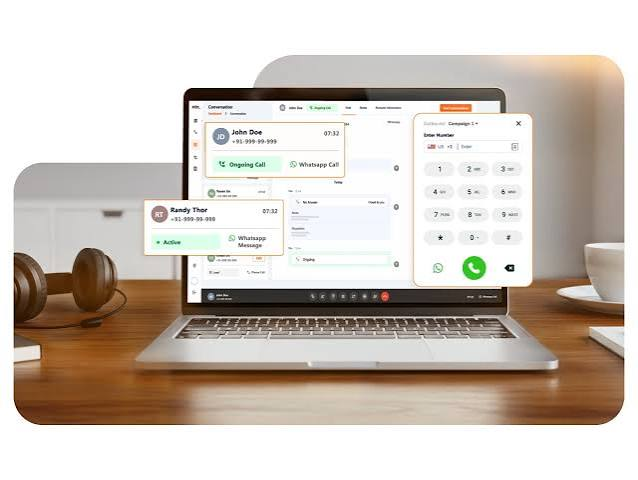
Business calls no longer have to depend on a physical desk phone. A web phone app lets employees make and receive business calls directly through a compatible web browser using an internet connection.
For distributed teams, sales departments, service teams, and growing businesses, browser-based calling can make business communications easier to access without requiring every employee to have dedicated phone hardware. Modern web phones can also connect with voicemail, call routing, CRM systems, and broader unified communications tools.
What Is a Web Phone App?
A web phone app is a software-based phone that runs inside a web browser.
Instead of connecting through a traditional telephone line, calls are transmitted using Voice over Internet Protocol, or VoIP. Users typically need a supported browser, internet connection, microphone, and speakers or headset.
A business web phone may allow users to:
- Make outbound calls
- Receive incoming calls
- Use a business caller ID
- Access voicemail
- View call history
- Manage contacts
- Transfer calls
- Use call recording
- Control availability
Public Telephone Company describes its web phone platform as a browser-based extension of its cloud-hosted business phone system.
How Does a Web Phone App Work?
A web phone connects the user’s browser to a cloud-based VoIP system.
When an employee places a call, voice is converted into digital data and transmitted through the internet. The cloud phone platform manages routing, business numbers, extensions, voicemail, and other PBX functions.
The basic workflow can look like this:
- The user signs into the web phone.
- The browser receives permission to use the microphone.
- The employee selects a contact or enters a number.
- The cloud phone system routes the call.
- The recipient sees the configured business number.
- Call history and related information can be stored within the system.
This gives employees access to business calling without tying them to one physical office phone.
What Are the Benefits of a Web Phone App?
No Dedicated Desk Phone Required
One of the biggest advantages is the ability to make calls from an existing computer.
VirtualPBX, for example, positions its browser phone as a no-download alternative to traditional desk phones.
Businesses can still use physical phones where they are useful, but remote or hybrid employees may not need additional hardware.
Access From Different Locations
Employees can connect to the business phone system from anywhere with suitable internet access.
This makes browser calling useful for:
- Remote employees
- Hybrid teams
- Traveling staff
- Call centers
- Sales teams
- Customer support teams
- Multi-location businesses
Users can continue making calls with a business number even when they are away from the office.
Keep Personal and Business Calls Separate
Using a personal mobile number for work can create privacy and consistency issues.
A web phone allows employees to place business calls using the organization’s configured caller ID rather than sharing their personal number.
This also makes it easier to keep business call history and voicemail within the company’s communication platform.
Web Phone App vs. Softphone
The terms web phone and softphone are sometimes used interchangeably, but there can be an important difference.
A traditional softphone is usually an application downloaded and installed on a computer or smartphone.
A web phone runs directly in a browser.
Web Phone
- Opens through a browser
- Usually requires no software installation
- Works well for temporary or flexible workstations
- Easier to access from different supported computers
Installed Softphone
- Requires an application
- May provide deeper operating-system integration
- Can support mobile-specific features
- May remain signed in independently of the browser
Some business phone providers offer both so employees can choose the interface that best fits their work style.
Web Phone App vs. Desk Phone
A desk phone remains useful in offices where employees spend most of their working day at a fixed workstation.
A web phone provides greater location flexibility.
Businesses do not necessarily have to choose only one. A cloud phone system can support a mix of browser phones, mobile apps, and physical VoIP phones.
Public Telephone Company supports browser-based calling alongside hosted VoIP and compatible physical communications equipment.
What Features Should a Business Web Phone App Include?
The right features depend on how employees communicate with customers and one another.
Important capabilities may include:
Business Caller ID
Employees should be able to place calls using company numbers rather than personal numbers.
Call Transfer
Calls should be easy to move between extensions or departments.
Voicemail
Users should be able to access messages without returning to a physical office phone.
Call History
A searchable record of recent calls helps employees manage follow-ups.
Call Recording
For appropriate business use cases, recording can support quality assurance, training, or documentation.
Contact Management
Users should be able to locate contacts quickly rather than manually entering every number.
Public Telephone Company’s platform also connects browser calling with hosted PBX features, unified communications, and customizable call-routing workflows.
Can a Web Phone App Integrate With CRM Software?
Yes.
CRM integration can connect phone activity with customer information and reduce repetitive administrative work.
Depending on the integration, employees may be able to:
- Display customer records when calls arrive
- Click a phone number to dial
- Record call activity automatically
- Add notes
- Connect calls with customer histories
Public Telephone Company offers custom integration services that can connect its communication platform with CRM and other business applications.
This can be particularly useful for sales, support, and customer-service teams handling large numbers of calls.
Is a Web Phone App Good for Remote Teams?
Browser phones are particularly well suited to remote and hybrid work because employees do not need to transport an office desk phone between locations.
A remote worker can sign into the company phone system through a supported browser and continue using their business extension.
This helps organizations maintain:
- Consistent business caller ID
- Centralized voicemail
- Extension dialing
- Common call-routing rules
- Shared communication records
Public Telephone Company specifically positions its browser-based calling tools for distributed and flexible workforces.
What Internet Connection Does a Web Phone Need?
Call quality depends heavily on network performance.
A stable broadband or business-grade connection generally provides the best experience.
Important network factors include:
- Available bandwidth
- Latency
- Jitter
- Packet loss
- Wi-Fi stability
Businesses with many simultaneous users may also want to review network capacity and Quality of Service settings so voice traffic receives appropriate priority.
Are Web Phone Apps Secure?
Business communication security involves more than simply encrypting browser traffic.
Organizations should also evaluate account security, access controls, provider infrastructure, call authentication, and regulatory compliance.
Public Telephone Company states that its platform supports STIR/SHAKEN, a framework designed to help authenticate caller identity and reduce spoofed calls.
Businesses with industry-specific compliance requirements should discuss those needs directly with the provider before deployment.
Can You Keep Your Existing Business Number?
In many cases, yes.
Business numbers can generally be moved between compatible telecommunications providers through number porting.
After porting, incoming calls can be routed to:
- Web phones
- Physical extensions
- Mobile users
- Ring groups
- Auto attendants
Public Telephone Company supports number porting into its cloud phone environment.
Keeping established numbers helps businesses change systems without requiring customers to learn new contact information.
What Should You Look for in a Web Phone App?
Before choosing a provider, consider:
- Browser compatibility
- Voice quality
- Business caller ID
- Voicemail
- Call routing
- Call transfer
- CRM integrations
- Mobile options
- Number porting
- Technical support
- Security and compliance
- Ability to add users
Scalability also matters if employee counts or call volumes are expected to grow.
Use a Web Phone App to Make Business Calling More Flexible
A browser phone can give employees the core functionality of a business telephone without restricting them to a physical desk phone. It can be particularly useful for remote teams, multi-location companies, call centers, and businesses moving from legacy phone systems to cloud communications.
Public Telephone Company combines browser calling with hosted VoIP, unified communications, custom integrations, scalable cloud infrastructure, and 24/7 technical support. Explore its web phone app to see how browser-based calling can fit into your existing business communications workflow.